Stop Asking AI the Wrong Questions: How the Copilot Prompt Optimizer Fixes Your Workflow Before It Starts
We built an AI agent whose single purpose is to make you better at talking to AI agents. Yes, it's as meta as it sounds. And yes, it works.
We built an AI agent whose single purpose is to make you better at talking to AI agents. Yes, it's as meta as it sounds. And yes, it works.
The Irony of AI Adoption
Here's the most embarrassing secret in enterprise AI: most people are terrible at prompting.
Not because they're unintelligent. Because nobody taught them. Organizations drop $500K on Copilot Studio licenses and then hand the keys to employees who type things like:
"Summarize this document"
"Write me a report"
"Help me with my project"
And then those same employees declare that "AI doesn't work" because the output was generic, unhelpful, or flat-out wrong.
The AI wasn't the problem. The prompt was the problem.
But here's where it gets deliciously ironic: we built an AI agent to fix how people talk to AI agents. An agent for agents. A prompt about prompts.
It works. And it might be the most important workflow in this entire collection.
Get immediate access to the full JSON schema for this workflow.
The "Blank Canvas" Problem
Every enterprise deploying generative AI faces the same adoption barrier: the blank prompt window.
Employees open Copilot Studio, see a text box, and freeze. They know AI can do something — they just don't know how to ask for it. So they either:
- Ask something too vague → Get a useless generic response → Conclude AI is overhyped
- Ask something too specific → The AI takes them literally → The output is technically correct but strategically wrong
- Don't ask at all → The license goes unused → The ROI calculation looks terrible
The Prompt Optimizer Engine solves all three failure modes at the source.
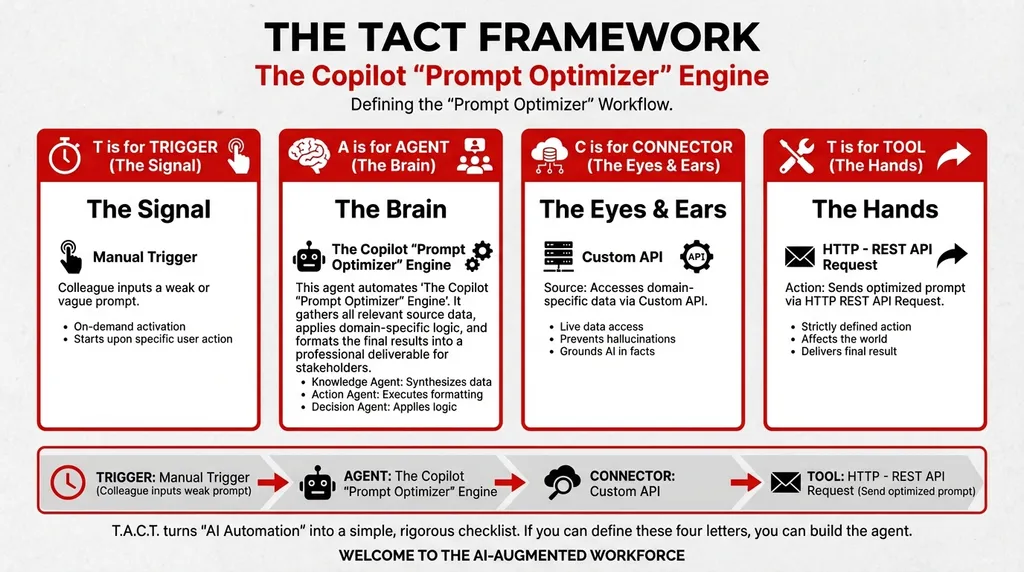
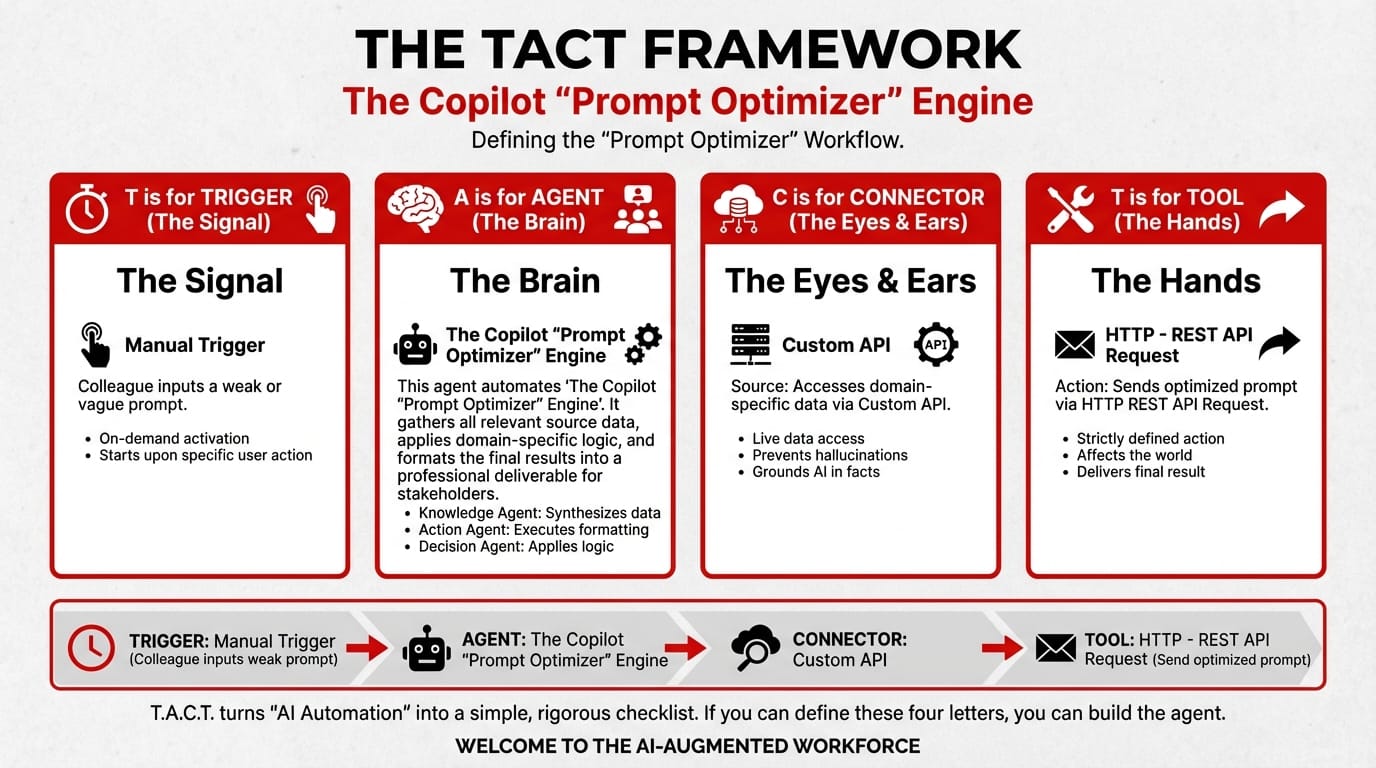
How It Works: The Three-Stage Pipeline
T — Trigger: Manual — Colleague Submits a Draft Prompt
The flow starts when any team member types a prompt they're about to send to another AI agent — but sends it to the Optimizer first.
Think of it as a "prompt check" before you hit the real "send" button.
A — Agent: The Copilot Prompt Optimizer Engine
Stage 1 — The Intent Analyzer: Before optimizing anything, the agent figures out what the user actually wants. This is critical because most bad prompts aren't wrong — they're incomplete. The Intent Analyzer reconstructs the underlying goal from the vague input.
| User Types | Intent Analyzer Interprets |
|---|---|
| "Summarize this document" | "Generate a structured executive summary highlighting key decisions, financial implications, and action items from this 14-page board report" |
| "Help me with my project" | "Provide a project status update framework that includes milestones, risks, and resource allocation for Q2 deliverables" |
| "Write a report" | "Draft a quarterly performance report using data from SharePoint, including KPIs, trend analysis, and recommendations" |
Stage 2 — The Prompt Engineer: Takes the interpreted intent and rewrites the prompt using agentic best practices:
- Assigns a clear persona/role to the receiving agent
- Specifies the exact data sources the agent should access
- Defines the output format (table, narrative, bullet points)
- Sets quality criteria (accuracy, completeness, actionability)
- Includes chain-of-thought instructions where appropriate
Stage 3 — The Tester: Evaluates the engineered prompt against a robustness checklist:
- Is the prompt specific enough to avoid ambiguous outputs?
- Does it include guardrails against hallucination?
- Is the output format defined?
- Would a different agent interpret this prompt differently?
System Prompt:
You are The Copilot "Prompt Optimizer" Engine. Your workflow:
- Collect Input Data: Gather all relevant source data, documents, and information.
- Consolidate & Structure: Organize and standardize the collected data.
- Analyze & Process: Solve the "blank canvas" problem. Your sole job is to help users talk to other agents better.
- Validate Results: Review the processed output for accuracy.
- Distribute Output: Format the final results and share with stakeholders.
C — Connector & T — Tool
| Component | Detail |
|---|---|
| Connector: Custom API | Connects to internal business systems for context |
| Tool: HTTP – REST API Request | Interacts with domain systems for prompt validation |
Real Example: Before and After Optimization
The Original Prompt (What the User Typed):
"Can you look at the sales data and tell me how we're doing?"
The Optimized Prompt (What the Optimizer Produced):
"You are a Sales Performance Analyst with access to the Q4 2025 sales tracker on SharePoint (/Sales/Q4_2025_Tracker.xlsx).
Your task: 1. Retrieve the sales data from the specified Excel file 2. Calculate total revenue, compare against the Q4 target ($2.1M), and compute the variance 3. Identify the top 3 performing product lines and the bottom 3 4. Flag any sales reps who are below 60% of individual quota 5. Output a structured summary table followed by a 3-paragraph executive narrative
Constraints: Use only data from the specified file. Do not estimate or generate hypothetical numbers. If data is missing for any field, note it as 'Data unavailable' rather than inferring a value.
Output format: Markdown table + narrative paragraphs."
Why the Optimized Version Works:
| Element | Original | Optimized |
|---|---|---|
| Role assignment | None | "Sales Performance Analyst" |
| Data source | "the sales data" (which?) | Specific SharePoint file path |
| Task structure | "tell me how we're doing" | 5 numbered steps |
| Output format | Undefined | Markdown table + narrative |
| Hallucination guardrails | None | "Do not estimate or generate hypothetical numbers" |
| Edge case handling | None | "Note as 'Data unavailable'" |
Why This Is the Most Important Agent in the Collection
Every other agent in this series — the Board Minutes Allocator, the Cultural Messaging Engine, the XBRL Reviewer — produces better output when it receives a better prompt.
The Prompt Optimizer is the force multiplier. It makes every other workflow more effective by ensuring the instructions going into them are clear, specific, and robust.
Deploy this agent first. Then deploy the rest.
It's an agent that makes agents better. Meta? Absolutely. Useful? Indispensable.
📚 Start with the Optimizer, then explore these: - How to Automate Board Meeting Minutes with Agentic AI — a governance workflow that benefits from precise prompting - The Future of Market Intelligence: Daily AI Briefs — proactive intelligence requires well-structured queries - What If Your Data Could Tell Its Own Story? The Data Visualization Brainstormer — ideation-driven workflow
The best AI user isn't the one who types faster. It's the one who prompts smarter.
Close the gap in your operations.
Get immediate access to the full JSON schema for this workflow. By subscribing to the Library, you can copy and paste this architecture directly into Microsoft Copilot Studio, M365 Workflows (Frontier) Agent, or Google Workspace Studio in minutes.
⚠️ The price increases by $100 on the first Thursday of next month.
Every month, we add 4 new agentic workflows to the Library. Because the Library's value constantly grows, the price to access it increases every month. Get access today for $380/year to secure all 16 current schemas—and lock in your rate before the next price hike.