
The Operator's Guide to Automating Customs and Logistics Document Verification with agentic AI
How the machine works: a no-nonsense walkthrough for operations managers who need to cross-check shipping documents against internal manifests — without the human error.
How the machine works: a no-nonsense walkthrough for operations managers who need to cross-check shipping documents against internal manifests — without the human error.
What This Guide Covers
This is a practical guide. No vision statements, no futuristic scenarios. Just the mechanics of building an AI agent that:
- Receives shipping documents and invoices as they arrive
- Parses quantities, descriptions, and declaration details across multiple unstructured documents
- Cross-checks every line item against your internal item manifests
- Flags discrepancies before they reach customs authorities
- Sends a verification report to the operations team
If you're an operations manager, logistics coordinator, or customs compliance officer dealing with multi-document cross-referencing, this is the system you need.
Get immediate access to the full JSON schema for this workflow.
The Problem This Machine Solves
A typical import shipment generates 3-7 documents: commercial invoice, packing list, bill of lading, customs declaration, certificate of origin, and sometimes an inspection report. These documents come from different parties (shipper, freight forwarder, customs broker), in different formats (PDF, Excel, email attachments), with overlapping but not identical data.
Your compliance team's job: make sure all documents agree with each other and with your internal purchase order/item manifest. If the invoice says 500 units but the packing list says 480, that's a problem. If the description says "electronic components" on the invoice but "computer parts" on the declaration, that's a customs risk.
The manual process: Open every document, manually compare line items, highlight discrepancies, draft a summary. For a complex shipment, this takes 2-4 hours. With 10+ shipments per week, it's a full-time job for one person.
The machine replaces the comparison, not the judgment. The agent does the line-by-line cross-referencing. The human reviews only the flagged discrepancies.
Machine Specifications
Input: The Trigger
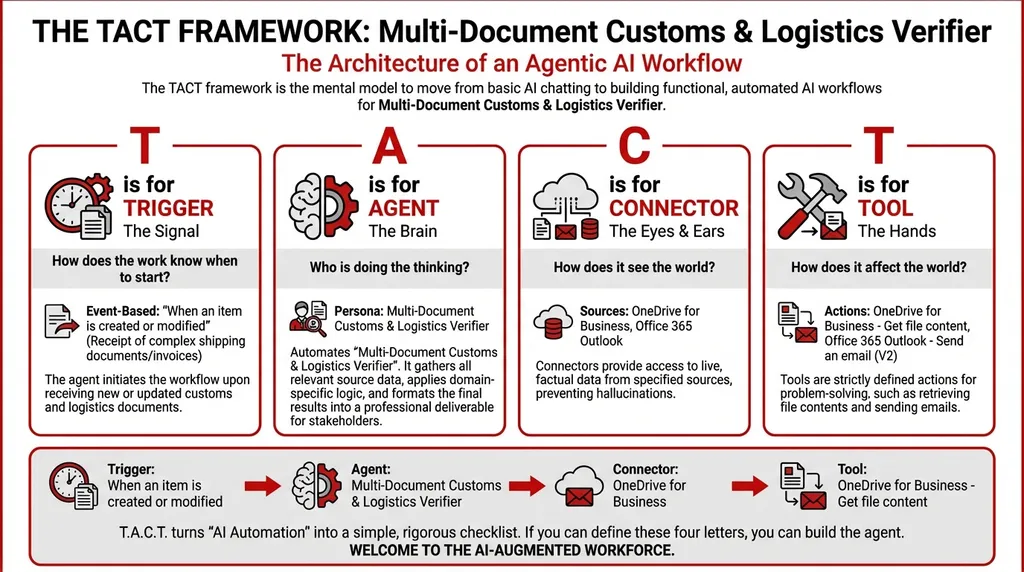
Trigger: When an item is created or modified
Configuration: Receipt of complex shipping documents/invoices
When shipping documents are uploaded to the designated OneDrive folder (or forwarded to the operations mailbox), the agent activates.
Operating principle: Don't make the operator remember to start the check. The document arrival is the start command.
Processing Unit: The Agent
Agent Type: Orchestrator
The agent runs three sequential processors:
Processor 1 — Invoice Parser: Reads the commercial invoice and packing list. Extracts: item descriptions, quantities, unit prices, total values, HS codes (where present).
Processor 2 — Declaration Cross-Checker: Compares parsed invoice data against customs declaration data. Checks: quantities match, descriptions are consistent, declared values align.
Processor 3 — Compliance Validator: Cross-references all external document data against your internal item manifests stored in OneDrive. Flags any discrepancies between what was ordered (internal) and what was shipped/declared (external).
System Prompt:
You are a Multi-Document Customs & Logistics Verifier. Your workflow:
- Collect Input Data: Gather all relevant source data, documents, and information.
- Consolidate & Structure: Organize and standardize the collected data.
- Analyze & Process: Perform multi-document reasoning. Sequentially cross-compare data across different unstructured PDFs/Excels, highlighting discrepancies before human review.
- Validate Results: Review the processed output for accuracy.
- Distribute Output: Format the final results and share with stakeholders.
Data Connections
| Connector | Purpose |
|---|---|
| OneDrive for Business | Access internal item manifests, purchase orders, and uploaded shipping documents |
| Office 365 Outlook | Receive forwarded documents and distribute verification reports |
Execution Tools
| Tool | Function |
|---|---|
| OneDrive for Business – Get file content | Reads shipping documents and internal manifests |
| Office 365 Outlook – Send an email (V2) | Distributes the verification report to the operations team |
Output: The Verification Report
Customs & Logistics Verification Report
Shipment: SHP-2025-1847 | Supplier: Zhongshan Electronics Ltd. | Agent: TACT Verifier v1.2
Documents Processed: - Commercial Invoice (CI-20251847.pdf) - Packing List (PL-20251847.pdf) - Customs Declaration (CD-SG-20251847.xlsx) - Internal Purchase Order (PO-4421)
Verification Summary:
Line Item Invoice Qty Packing List Qty Declaration Qty PO Qty Status 1 PCB Assembly Type A 500 500 500 500 ✅ Match 2 LED Module B-12 1,000 1,000 1,000 1,000 ✅ Match 3 Capacitor Pack C-7 200 180 200 200 ⚠️ Qty mismatch: PL shows 180, all others show 200 4 Connector Kit D-3 300 300 300 300 ✅ Match Description Consistency Check:
Line Invoice Description Declaration Description Status 1 "Printed Circuit Board Assembly" "Electronic components — PCB" ⚠️ Wording differs. Verify HS code alignment. 2 "LED Module B-12" "LED Module B-12" ✅ Match 3 "Ceramic Capacitor Pack" "Capacitors, ceramic" ✅ Acceptable variation 4 "Connector Kit D-3" "Connector Kit D-3" ✅ Match Flags Requiring Human Review: 1. 🔴 Line 3: Quantity discrepancy — packing list shows 20 fewer units than invoice and declaration. Verify whether 20 units were back-ordered or if the packing list contains an error. 2. 🟡 Line 1: Description mismatch between invoice and customs declaration. Both likely refer to the same item, but inconsistent wording could trigger a customs query. Recommend aligning descriptions before submission.
Operating Instructions
First-Time Setup
- Create a dedicated folder in OneDrive:
/Operations/Shipping_Documents/Incoming/ - Upload your internal item manifest/purchase order template to:
/Operations/Internal_Manifests/ - Configure the trigger to monitor the
Incomingfolder - Set the email distribution list for verification reports
Daily Operation
- Forward incoming shipping documents to the monitored OneDrive folder (or have the freight forwarder upload directly)
- The agent runs automatically upon document receipt
- Review the flagged items in the verification report
- Resolve discrepancies before customs submission
Error Handling
- If a document is unreadable (corrupted PDF, password-protected Excel), the agent will flag it as "Unparseable" and continue processing the remaining documents
- If the internal manifest for a specific PO is not found, the agent will compare external documents against each other only, and note that internal verification was skipped
Maintenance Schedule
| Task | Frequency | Purpose |
|---|---|---|
| Review flag accuracy | Monthly | Ensure the agent isn't generating false positives |
| Update internal manifest templates | As needed | Keep the internal baseline current |
| Review description matching sensitivity | Quarterly | Adjust tolerance for acceptable description variations |
📚 Related operational automation guides: - Is Your Weekly Management Report Broken? The Omni-Format Consolidator — multi-source data consolidation - Why Customer Feedback Keeps Getting Misrouted: The Cultural Triage System — intelligent routing for cross-border operations - Stop Asking AI the Wrong Questions: The Copilot Prompt Optimizer — essential reading for new TACT users
Built for operators. Not for dreamers.
Close the gap in your operations.
Get immediate access to the full JSON schema for this workflow. By subscribing to the Library, you can copy and paste this architecture directly into Microsoft Copilot Studio, M365 Workflows (Frontier) Agent, or Google Workspace Studio in minutes.
⚠️ The price increases by $100 on the first Thursday of next month.
Every month, we add 4 new agentic workflows to the Library. Because the Library's value constantly grows, the price to access it increases every month. Get access today for $380/year to secure all 16 current schemas—and lock in your rate before the next price hike.