What We Learned When We Let an AI Agent Write (and Critique) Our Post-Event Report
A retrospective on deploying a self-correcting report generator — what worked, what surprised us, and why the "Harsh Reviewer" changed how we think about AI output quality.
The Experiment
We'd just wrapped up a two-day leadership workshop. 120 attendees. 8 facilitators. 400+ feedback forms sitting in a SharePoint folder.
The task: produce a post-event report for the executive sponsors — the kind that doesn't just summarize what happened, but tells them what it means and what to do next.
We'd been hearing about "self-correcting AI" — agents that evaluate their own output before presenting it. We wanted to test the claim. So instead of writing the report ourselves, we gave the job to the Self-Correcting Workshop/Event Report Generator — an agentic workflow with a built-in quality critic.
Here's what we learned.
Get immediate access to the full JSON schema for this workflow.
Lesson 1: The First Draft Was Generic (And That Was the Point)
When the agent processed the 400+ feedback forms, its initial draft looked like every post-event report you've ever read:
"The workshop was well-received, with 87% of attendees rating the overall experience as 'Excellent' or 'Very Good.' Key highlights included the keynote session and breakout discussions. Recommendations include extending the networking segment and providing more hands-on exercises."
Fine. Accurate. Utterly unremarkable.
But here's the thing: the agent wasn't done. That was just Stage 1. The self-reflecting loop was about to kick in.
Lesson 2: The "Harsh Reviewer" Was Genuinely Harsh
Stage 2 activated: the Harsh Reviewer — a separate analytical persona within the same workflow, whose sole purpose is to evaluate whether the insights generated in Stage 1 are actually actionable or just generic platitudes.
Here's what the Harsh Reviewer said about the first draft:
Self-Reflection Critique:
❌ "The workshop was well-received" — Generic. Every post-event report says this. What specifically was well-received? Which sessions and why?
❌ "87% rated it Excellent or Very Good" — This is a vanity metric without context. What did the remaining 13% say? What were the patterns in dissatisfaction?
❌ "Key highlights included the keynote and breakouts" — This is a list, not an insight. Why were they highlights? What made them effective?
❌ "Recommendations: extend networking, more hands-on" — These are generic post-event recommendations that appear in virtually every report. Are they supported by the data, or are they assumed?
Overall Assessment: This report summarizes what happened. It does NOT provide actionable intelligence. Revise to include cause-and-effect analysis, specific data patterns, and recommendations tied to measurable outcomes.
We didn't program that critique. The Harsh Reviewer concluded independently that the first draft was insufficient.
Lesson 3: The Second Draft Was Unrecognizably Better
After the Harsh Reviewer's feedback, Stage 3 — the Refiner — rewrote the report. Here's a section-by-section comparison:
Section: Keynote Session
First Draft:
"The keynote session was the highest-rated segment, with 92% positive feedback."
After Self-Correction:
"The keynote session received the highest satisfaction score (92% positive), driven primarily by two factors identified in qualitative comments: (1) the speaker's use of real case studies from the APAC market, cited by 34 attendees as 'directly relevant to my work,' and (2) the interactive polling segment, which 28 attendees described as 'engaging.' Notably, 6 of the 8 negative comments focused on session length (45 min was 'too short'), suggesting this format has room to scale rather than needing reduction."
Section: Recommendations
First Draft:
"We recommend extending the networking segment and providing more hands-on exercises for future events."
After Self-Correction:
"Recommendation 1 — Extend Keynote, Not Networking: Attendees cited keynote interactivity (not networking) as the primary driver of satisfaction. Extending the keynote by 15 minutes would address the 'too short' feedback from 7.5% of respondents, while the networking segment received minimal qualitative mentions (positive or negative), suggesting it is adequately timed.
Recommendation 2 — Restructure Breakout Sessions for Role-Specificity: The lowest-rated breakout ('Digital Transformation Strategy') received criticism not for content quality, but for audience mismatch — 12 attendees noted the session was 'too high-level' while 8 described it as 'too technical.' This pattern suggests a need for role-based breakout tracks (leadership vs. practitioner) rather than topic-based sessions.
Recommendation 3 — Introduce Post-Event Action Commitments: 0% of feedback forms asked attendees what they would do differently after the workshop. Adding a 'My #1 Action Commitment' field to the feedback form would transform the post-event report from a satisfaction summary into a strategic impact tracker."
Lesson 4: The Architecture Made the Difference
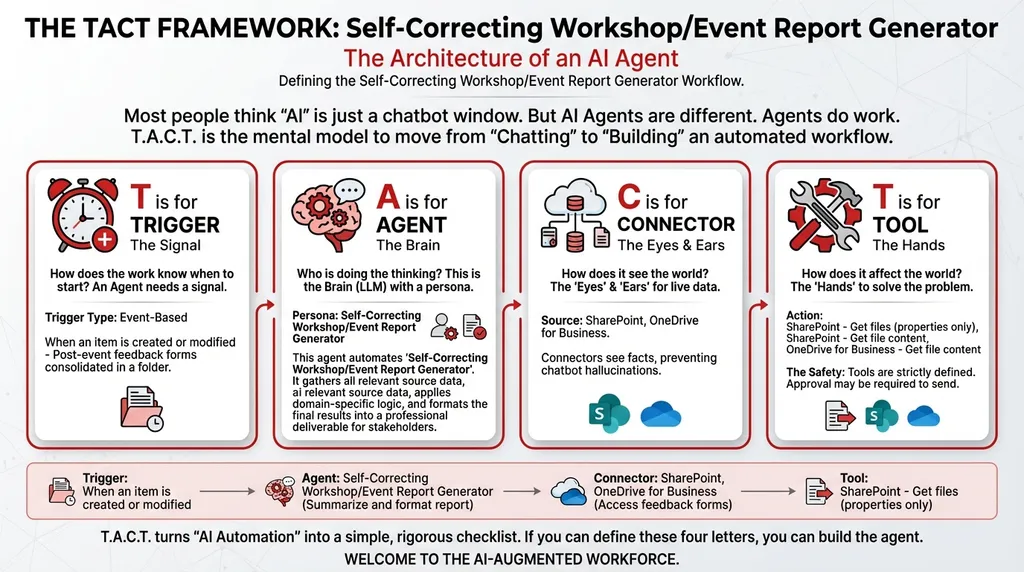
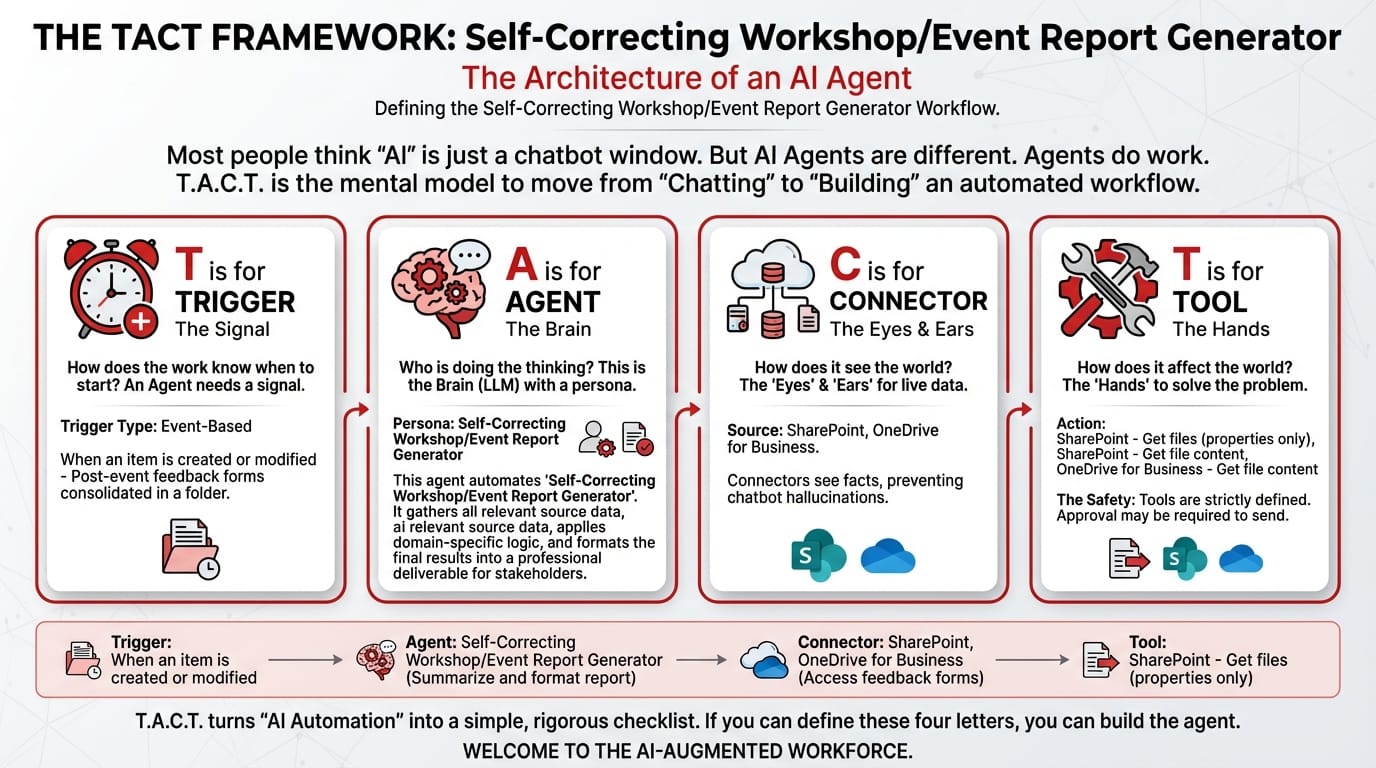
The TACT Breakdown
T — Trigger: When an item is created or modified
Post-event feedback forms consolidated in a SharePoint folder. The moment the final batch is uploaded, the agent activates.
A — Agent: Self-Correcting Workshop/Event Report Generator (Orchestrator Type)
Three personas operating in sequence:
| Stage | Persona | Role |
|---|---|---|
| 1 | Data Aggregator | Processes all feedback forms, extracts quantitative scores and qualitative comments |
| 2 | Insight Generator | Produces the first-draft report with analysis and recommendations |
| 3 | Harsh Reviewer | Self-reflection loop: evaluates whether insights are genuinely actionable or generic platitudes. Forces a rewrite if quality is insufficient. |
System Prompt:
You are a Self-Correcting Workshop/Event Report Generator. Your workflow:
- Collect Input Data: Gather all relevant source data, documents, and information.
- Consolidate & Structure: Organize and standardize the collected data.
- Analyze & Process: Ensure final reports sent to management aren't just summaries of "what happened," but contain high-quality, re-evaluated, actionable recommendations.
- Validate Results: Review the processed output for accuracy.
- Distribute Output: Format the final results and share with stakeholders.
C — Connectors:
| Connector | Role |
|---|---|
| SharePoint | Access consolidated feedback forms |
| OneDrive for Business | Access historical event reports for benchmarking and past templates |
T — Tools:
| Tool | Function |
|---|---|
| SharePoint – Get files (properties only) | Lists feedback form files |
| SharePoint – Get file content | Downloads forms for aggregation and analysis |
| OneDrive – Get file content | Retrieves past event reports for quality comparison |
Lesson 5: Self-Correction Is the Future of AI Quality
The biggest learning from this experiment wasn't about event reporting. It was about AI output quality in general.
Most organizations treat AI outputs as final. The agent generates a report, a summary, a draft — and the human reviews it. This creates a subtle problem: the burden of quality assurance falls entirely on the human. If the human is busy, tired, or unfamiliar with the subject matter, low-quality AI output passes through unchecked.
self-correcting agents add an internal quality gate. The AI argues with itself before the human even sees the result. The human reviews a second-generation output — one that has already been critiqued and improved.
It's the difference between reading a rough draft and reading an edited manuscript.
What We'd Do Differently
-
Calibrate the Harsh Reviewer's standards. On our first run, the Reviewer flagged everything as generic, including some legitimately useful observations. We added guidance: "Accept quantitative observations supported by data. Reject qualitative observations that lack specific attendee citation counts."
-
Add historical benchmarking. The second version of our agent compares scores against past events stored in OneDrive. "Keynote rated 92% — up from 84% at last year's workshop" is more insightful than "92% positive."
-
Include the self-reflection log in the final report. We started appending a summary of what the Harsh Reviewer critiqued and why. Leadership found it fascinating — it built trust in the AI's output by showing the reasoning behind the refinement.
Close the gap in your operations.
Get immediate access to the full JSON schema for this workflow. By subscribing to the Library, you can copy and paste this architecture directly into Microsoft Copilot Studio, M365 Workflows (Frontier) Agent, or Google Workspace Studio in minutes.
⚠️ The price increases by $100 on the first Thursday of next month.
Every month, we add 4 new agentic workflows to the Library. Because the Library's value constantly grows, the price to access it increases every month. Get access today for $380/year to secure all 16 current schemas—and lock in your rate before the next price hike.